Incidents & Forms (Property)
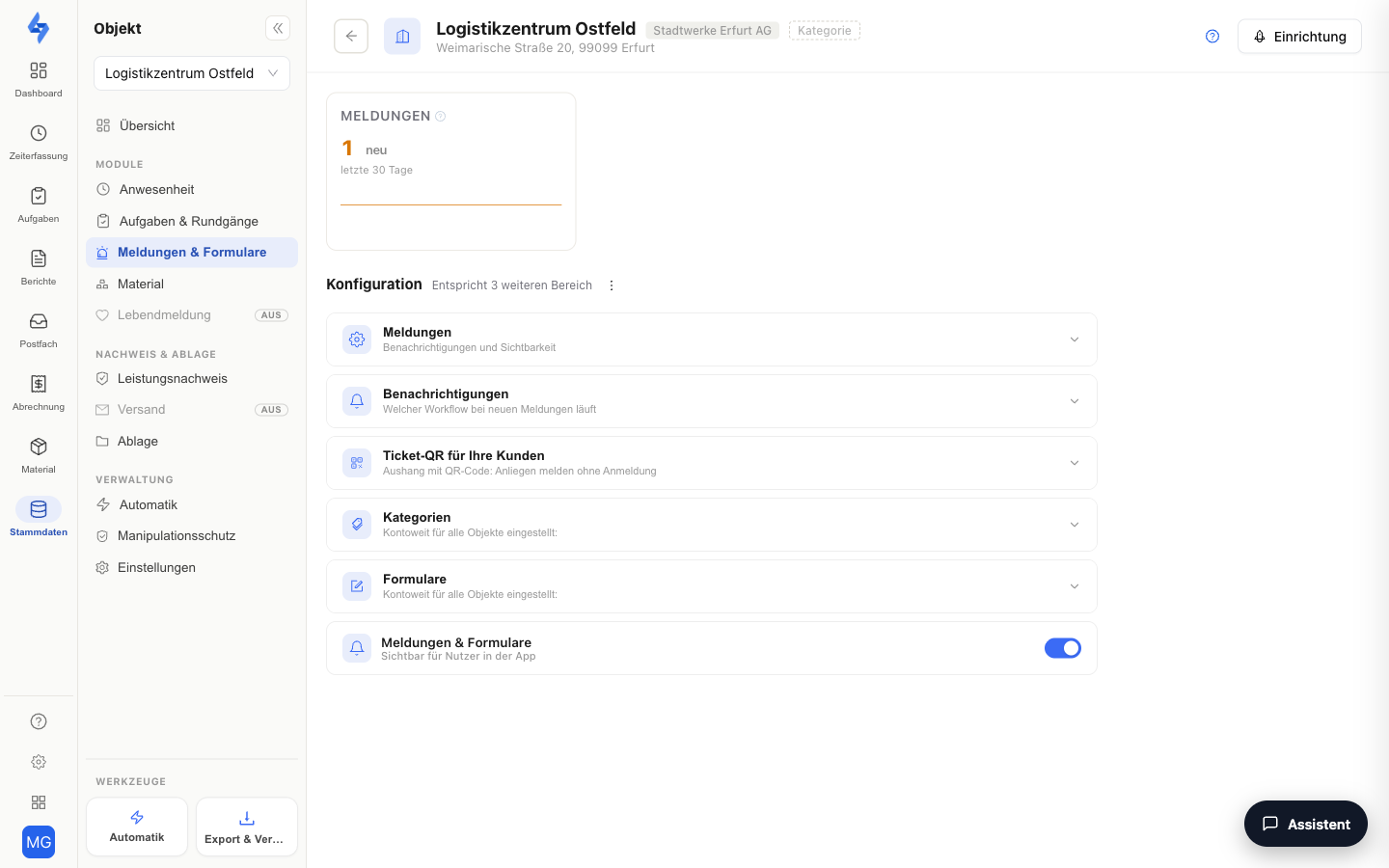
On this tab, you enable and configure incident reporting for the selected property. Employees can then create incidents (occurrences, damage, notes) at this property via the mobile app — and with the optional ticket QR poster, even end customers or passers-by can report an issue, entirely without an app or login.
Navigation: Master Data → Properties → select a property → panel entry "Incidents & Forms" (group "Features")
What Is This View For?
This tab is the property-level configuration of the incident feature — it controls whether and under which rules incidents can be recorded at this property. It is deliberately not a list of incidents: you view and process the actual recorded incidents across all properties in the Reports area — a key figure tile at the top of the tab shows the incidents of the selected period and jumps into the filtered list on click.
Configuration
The expandable Incidents card contains these toggles:
| Toggle | Effect |
|---|---|
| Location check | "Allows actions only when the device's GPS position matches the property." When active, the phone must be inside the property area when creating an incident. The location proof is set per feature and saved with this card; the overall view is on the Tamper Protection tab. |
| AI classification | Has new incidents of this property classified automatically by the AI (category, severity, title). Off by default. The toggle is locked as long as AI classification is not enabled account-wide under Settings → Features → AI Features. The same toggle additionally governs the polishing of incident texts, provided you have enabled that account-wide — there is deliberately no second property toggle for it. |
The feature switch "Incidents & Forms" ("Visible to users in the app") sits at the very bottom of the tab: when off, the incident feature does not appear in the app for this property. If the feature is disabled, the tab shows an activation card at the top; the feature configuration is then grayed out — the ticket QR and the account-wide catalogs (categories, forms) remain usable.
:::caution AI classification is a double opt-in Automatic classification only runs when both are on: the account switch under Settings → Features → AI Features and the property switch here. A new property always starts with AI classification switched off.
The same applies to the AI text version of an incident: if the property toggle is off, LiteLog produces neither a classification nor a text version for that property's incidents. How to approve, discard or edit a generated version is described under Incident reports → AI text version. :::
Ticket QR for Your Customers
With the ticket QR, you put up a poster with a QR code at the property. Anyone who scans it — end customer, tenant, passer-by — can report an issue with a description and photo, without login and without an app. The report arrives like any other in the Reports area and is marked there as a public QR report.
The "Ticket QR for your customers" accordion (permission Edit properties) offers:
| Element | Meaning |
|---|---|
| Allow reports via QR code | Main switch of the public reporting channel. Switching it off keeps the code — printed posters keep working after re-enabling. |
| Copy | Copies the public URL behind the QR code (e.g. for testing in the browser). |
| Download | Dropdown with two paths: download the plain QR code as PNG, or create the finished poster — a dialog asks for a headline (default: "Something is not right?") and an optional description and generates the print-ready PDF. |
| Generate new code | Replaces the QR code (with confirmation). Caution: All previously printed posters become invalid immediately — only use this if the old code is compromised. |
The active ticket QR also appears as a card on the property overview.
Categories and Forms (Quick Access)
Two further accordions show the account-wide foundations of incident reporting directly at the property — they apply to all properties:
- Categories — the incident categories as colored chips, with a link "Manage incident categories" (Settings → Incident Categories).
- Forms — the published form templates, with a link "Manage form templates" (Settings → Form Templates).
Good to Know
:::tip Note
- Incidents can contain photos, a text description, and a GPS location (optionally also a checkpoint reference).
- Incidents recorded during a round automatically appear in the timeline of the round protocol (if time and property match the round).
- You set up notifications for new incidents via an automation rule with the trigger "Incident created" — either account-wide in the Automation area or per property under Automation (Property). Without such a rule, switched on, nobody is notified about a new incident. This also applies to reports via the ticket QR.
- Which fields the incident form shows does not depend on this tab but on the system template "Incident" under Settings → Form Templates.
- Incidents are preserved if the reporting employee is deleted later (only the employee reference is removed). When the property is deleted, its incidents are deleted with it. :::
Permissions
:::info Permission To open this tab, you need View incidents or Edit properties. Contact your administrator if you don't have access. :::
| Action | Permission |
|---|---|
| Change configuration (incl. ticket QR) | Edit properties |
| Create incident (app) | Create incidents |