Tasks & Routes
The "Tasks" area is the shared workspace for everything that needs to get done: tasks (e.g. defects, repairs, maintenance) and completed rounds appear together in one list. On top of that comes the coverage report.
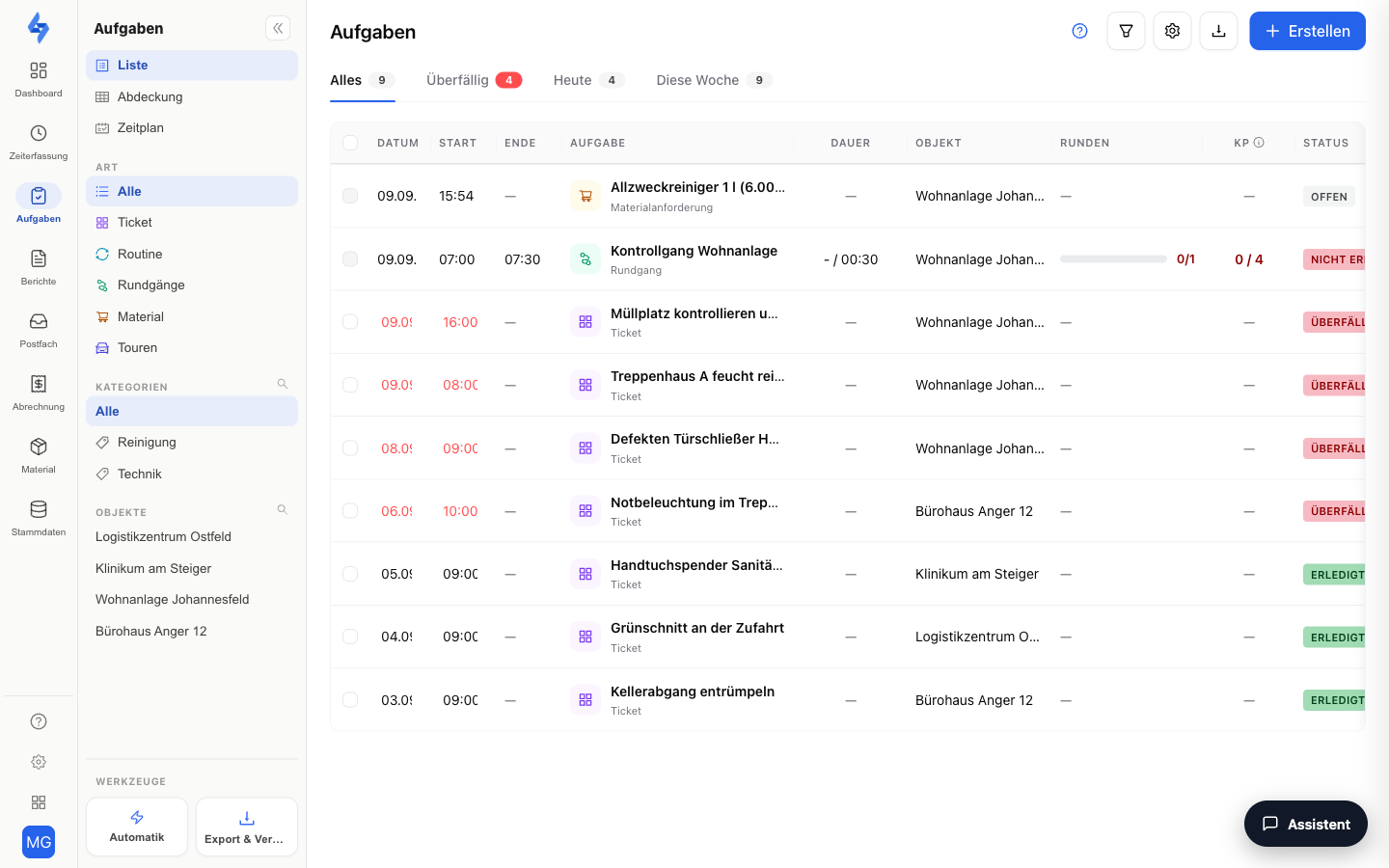
Features Overview
Views
Choose the view at the very top of the left sidebar:
| View | Shows |
|---|---|
| Schedule | Planning per property in three views: Day (one row per property across 0–24 h — patrol and tour rules as bands, tasks as diamonds, shifts as a stripe, create a task by clicking the free area), Week (the same rows with seven day cells and status counts) and List |
| List | The Schedule's List view: mixed table of tasks and round logs with inline editing |
| Coverage | Separate page: checkpoint scans per property and day |
The former Board and Map views were removed; their links lead to the List. The former Calendar is now the Schedule.
Time Filter Tabs
Above the list you will find the time filter tabs All / Overdue / Today / This Week — each with a counter showing how many tasks fall into that period. This way you can see at a glance what is due today or this week and what is already overdue. Next to them sits the Not feasible tab with a counter — tasks an employee has reported as not feasible with a reason (see List).
The Sidebar on the Left
The left sidebar is the actual filter of the workspace. From top to bottom:
| Section | Description |
|---|---|
| Views | List, Coverage and Schedule — the switcher between the three views. "Coverage" only appears with the permission to see routes. |
| Type | All · Ticket · Routine · Routes — "Ticket" are one-off tasks, "Routine" recurring ones, "Routes" the rounds walked on site. With the Material feature enabled, Material (material requests) is added. "All" clears the selection again. |
| Route | Only appears while "Routes" is active: narrows down to one specific route. |
| Categories | Filters by the categories (labels) assigned to a task. |
| Properties | Shows only entries for a specific property. |
One click on an entry filters the list right away, a second click removes the filter again. The Route, Categories and Properties sections additionally offer a magnifier for searching long lists and show a Show more link from nine entries onwards.
If the sidebar is collapsed, you can reopen it using the arrow on the left edge.
New Task
The "Create" button opens the create sidebar on top of the current view — you never lose the context of the list. Clicking an existing task opens the detail view.
Tickets from Customers
Customers with portal access can report their own tickets. These arrive as tasks and are recognizable by the customer indicator in the "Created by" column (hidden by default — enable it via the columns button).
Where Tasks Come From
Tasks are created in four ways:
- Manually — via the "Create" button in the workspace or in a property's Tasks tab; for a quick task, the name is enough.
- From an incident — every incident lets you create a follow-up task directly, which stays linked to the incident. Where to find incidents is shown in Data & Reports.
- From a form or via automation — submitted forms can trigger follow-up tasks, and automation rules create tasks as an action (e.g. the template "QA score below threshold → escalation" creates the re-cleaning task). See the Form Editor and Automation — Rules.
- From your client as a ticket — customers with portal access report tickets that arrive as tasks, recognizable by the customer indicator in the "Created by" column.
:::caution The customer sees your comments On a customer ticket, a comment from the task detail view goes back to the customer by default and notifies them by e-mail. For internal discussion, tick the Internal note checkbox while writing — the comment then stays visible to your team only; the customer does not see it and gets no e-mail. :::
Good to Know
:::tip Note
- What you see in the workspace depends on your permissions: task content requires "View tasks", route content requires "View round evaluation". With only one of the two permissions, you see the matching part.
- Routes themselves are created per property (Property → Tasks → "Setup" view) — the workspace shows the completed rounds.
- You can find the chronological scan log of all checkpoints under Dashboard → Evidence → Activity (filter "Routes").
- Each property has its own Tasks tab: the same workspace, pre-filtered to that property.
- Tasks go through the statuses Open, In progress, Cancelled, and Done. Custom statuses cannot currently be created in the portal.
- A due task has three outcomes: Done, Open or Overdue, and Not feasible. The third is reported by the employee from the app with a reason (access denied, material missing, area occupied, safety risk, equipment defective, other); the property manager reviews or dismisses the report in the detail view. A reported task counts neither as done nor as overdue. :::
Permissions
:::info Permission To use this page, you need the View tasks or View round evaluation permission. Contact your administrator if you do not have access. :::
| Action | Permission |
|---|---|
| See tasks | View tasks |
| See round logs and coverage | View round evaluation |
| Create a task | Create tasks |
| Edit a task | Edit tasks |
| Complete a task | Complete tasks |
| Delete tasks (multi-select in the list) | Delete tasks |