Coverage
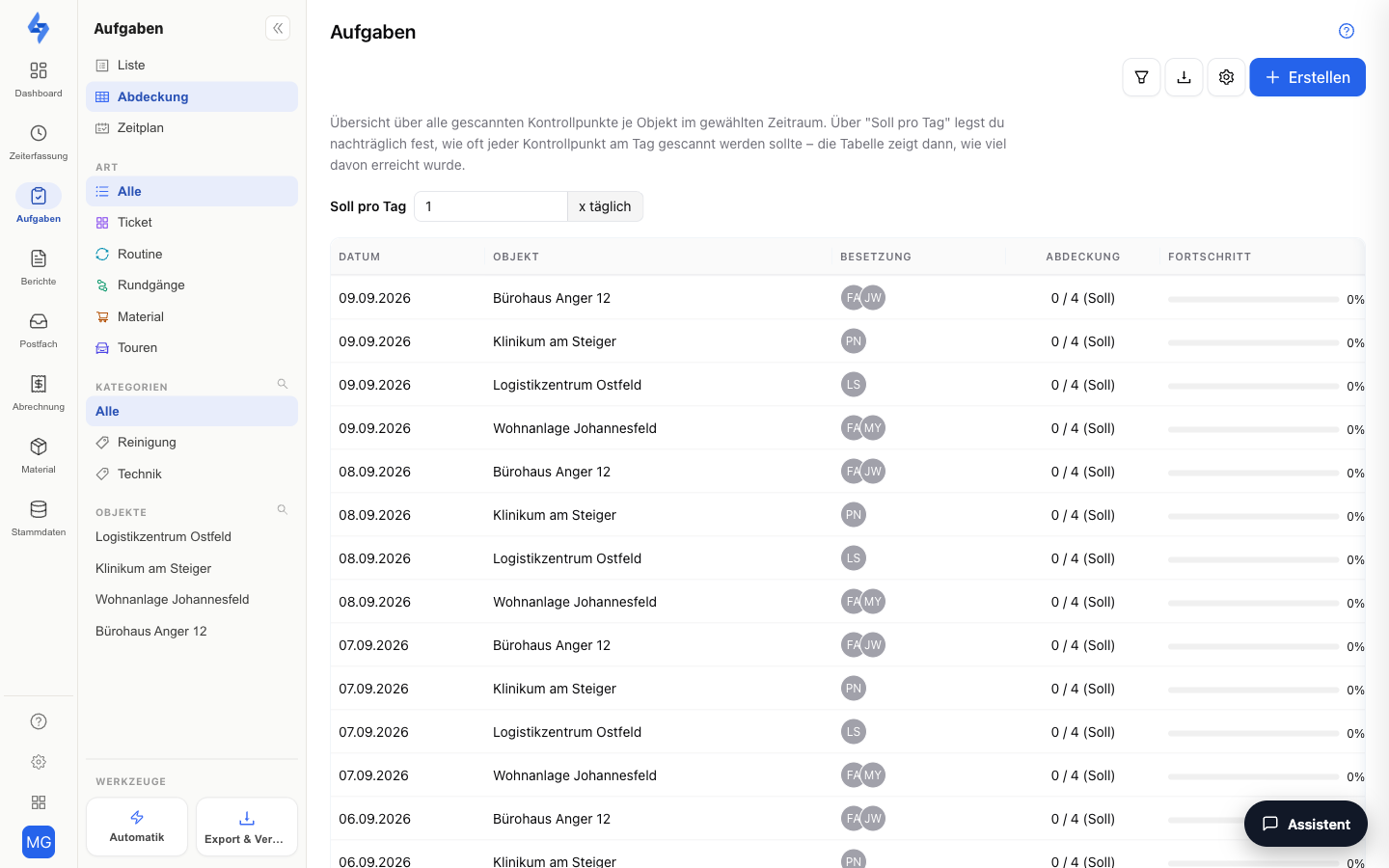
The coverage report answers the question: Was every property sufficiently inspected on every day? The table shows the checkpoint scans per property and day and puts them in relation to your target.
Features Overview
Coverage Table
Each row is a property-day. The columns show the date (weekday and day), property, the planned staffing of the day (from shift planning), the coverage as a bar with "actual/target", and the status (Full, Partial, None). The status only appears on past days — today is still running, the cell stays empty. Properties without checkpoints have no target and show a dash. Columns can be shown and hidden via the columns button.
Target per Day
Use the "Target per day" field in the filter row (funnel in the page header; 1–24, "x daily") to define how often each checkpoint should be scanned per day; the target of a property-day is this value times the number of checkpoints. The rating adjusts immediately. The target is a pure display parameter of this view — it is not saved on the property, and exports include whatever value is currently set.
Day Detail
Clicking a row opens the detail sidebar for that property-day: per checkpoint the status (Scanned/Missing or Met/Partial), the number of scans, the last scan, and the person who scanned last.
Export
Use the export button to download the coverage as CSV or PDF (the "Target per day" report) — the currently set target value is applied. Via "Schedule export" you set up a recurring delivery with the filters prefilled. Requires the Export round evaluation permission.
The Sidebar on the Left
The same sidebar as in the List: at the top the switcher between List and Coverage, below it Type, Route, Categories and Properties. See Tasks & Routes.
More Filters in the Header
The filter button reveals the filter row:
| Filter | Description |
|---|---|
| Employee | Shows only scans by a specific employee |
| Property | Shows only a specific property |
| Date range | Sets the date range under review — a maximum of 14 days at a time |
Good to Know
:::tip Note
- Coverage counts the checkpoints actually scanned — from scheduled and free routes. Work-time tags do not count; points that were previously created as a “task point” count like any other checkpoint.
- Tasks do not feed into coverage — a task reported as not feasible does not change the actual value either. The fulfilment rate of recurring tasks is in the List (column "Done (30d)"); reported occurrences do not count as done there and are listed separately in the tooltip.
- You can find the chronological scan log of individual checkpoints under Dashboard → Evidence → Activity (filter "Routes").
- The view can be shared as a link: filters and the opened day detail are preserved in the address bar. :::
Permissions
:::info Permission To use this page, you need the View round evaluation permission. Contact your administrator if you do not have access. :::